![AgriNous_RGB_Primary (Mobile).png]](https://support.agrinous.com.au/hs-fs/hubfs/AgriNous_RGB_Primary%20(Mobile).png?height=45&name=AgriNous_RGB_Primary%20(Mobile).png)
Please note - This is not always turned on for All Access or User Plans
You may need to contact your Team Member who manages your access.
When Emails are sent by either confirming the sale or Manually Sending, a log of these emails is kept in the inbox, which is located on the left-hand side of the Dashboard.
Email - Outbox
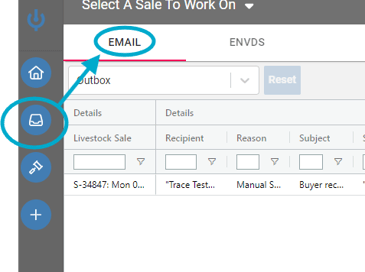
Here you will see the log of emails sent. There are two views, but they can be customized using the agri-grid on the right of the screen.
The Inbox will let you know if the Message has been Created, Dispatched, Queued, Delivered, Bounced, Opened, or Clicked.

Below is a recording of when an email is opened and its response.
Reasons for Reports
- Buyer Report, Commercial & Compliance - Sent when Sale is Confirmed
- Vendor Report - These can only be sent manually in the sale reports, Vendors.
- Deployment Report - reports are sent to the deployment agent once the sale is Confirmed
- Manual Send - send manually after sale confirmation by clicking on reports and sending
- Consigned to Report - Sent when Sale is Confirmed
Sender - Who sent the email