![AgriNous_RGB_Primary (Mobile).png]](https://support.agrinous.com.au/hs-fs/hubfs/AgriNous_RGB_Primary%20(Mobile).png?height=45&name=AgriNous_RGB_Primary%20(Mobile).png)
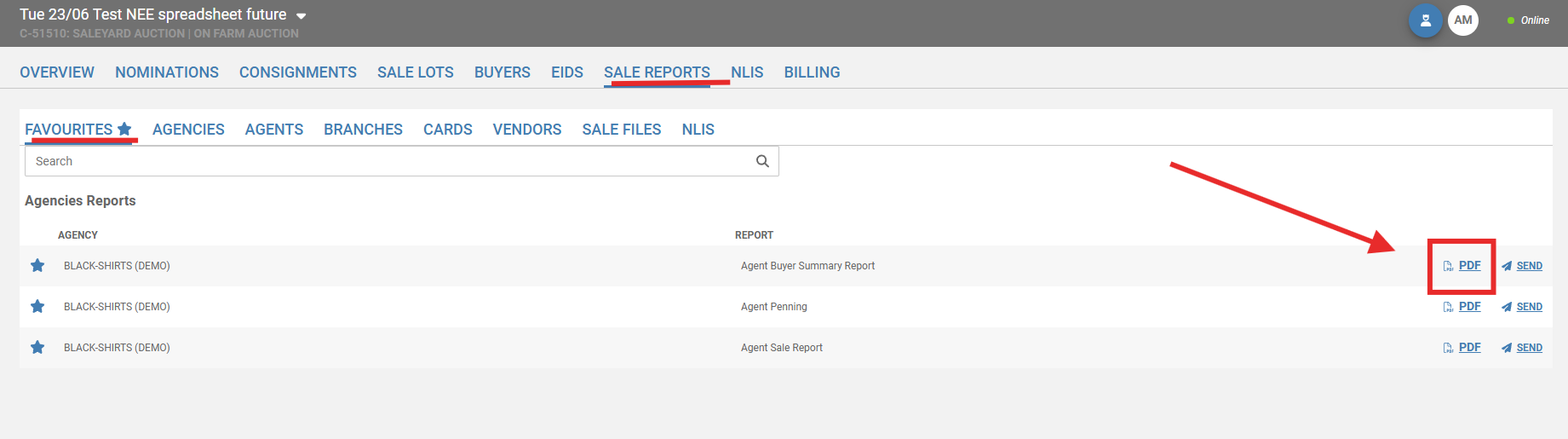
Navigate to reports in Agrinous
Once you have located the report you wish to send. Select the PDF.
Once the report is generated use the forward icon to send it on.
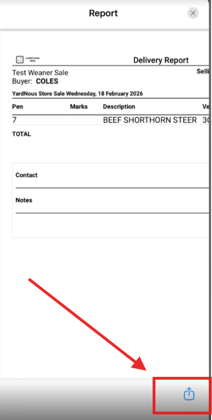
Select to message or email etc from your phone options.
Please note :
When texting PDF reports:
iPhone will send to iPhone,
Android will send to Android,
iPhone won't send to Android,
Android will send to iPhone
An alternative could be to screenshot the report on your mobile and send it that way or use the send function and email the report.
Once you have located the report you wish to send. Select the PDF.
Once the report is generated use the forward icon to send it on.
Select to message or email etc from your phone options.
Please note :
When texting PDF reports:
iPhone will send to iPhone,
Android will send to Android,
iPhone won't send to Android,
Android will send to iPhone
An alternative could be to screenshot the report on your mobile and send it that way or use the send function and email the report.